Streamlining Communication: Sending Webhook Messages from Heroku to Discord

In this article, we delve into the seamless integration of Heroku, a popular cloud platform, with Discord, a widely used communication platform. The focus is on sending webhook messages from Heroku to Discord, enhancing real-time updates and notifications for various applications. The article guides readers through the process, offering a step-by-step approach to set up and configure webhooks, ensuring efficient and automated communication between Heroku-hosted applications and Discord channels. With this integration, users can stay informed, monitor events, and streamline communication effortlessly.
In order to communicate between Heroku and Discord we need to create a small application to parse our webhook messages to the format from Discord. The app contains the following aspects:
Features
1. Express.js Server Setup:
— Utilizes the Express.js framework to create a web server.
— Listens on the specified port (process.env.PORT or defaulting to 3000).
2. Heroku Webhook Handling:
— Provides a route (/heroku-webhook) to handle incoming Heroku webhook events.
— Extracts relevant data from the Heroku webhook payload, including event data and metadata.
— Formats a message based on the extracted data to provide a concise summary of the Heroku event.
3. Discord Webhook Integration:
— Utilizes the Axios library to send a formatted payload to a Discord webhook.
— The Discord payload includes an embed with information about the Heroku event.
4. Environment Variable Usage:
— Uses process.env to read the PORT and DISCORD_WEBHOOK environment variables.s.
—Provides default values for PORT (3000) and logs the DISCORD_WEBHOOK value.
You can find the code I used on my GitHub Repository.
Let’s code
We will need some dependencies to create our application. Let’s install them using the following commands:
npm init
npm install [email protected]
npm install [email protected]
npm install [email protected]
You should be able to obtain a package.json file similar to mine:
{
  "name": "heroku-discord",
  "version": "1.0.0",
  "description": "Parser for heroku webhook messages to discord webhook messages",
  "main": "index.js",
  "scripts": {
    "test": "echo \"Error: no test specified\" && exit 1"
  },
  "repository": {
    "type": "git",
    "url": "git+https://github.com/WebCDC/heroku-discord.git"
  },
  "author": "Rui Coelho",
  "license": "ISC",
  "bugs": {
    "url": "https://github.com/WebCDC/heroku-discord/issues"
  },
  "homepage": "https://github.com/WebCDC/heroku-discord#readme",
  "dependencies": {
    "axios": "^1.6.5",
    "body-parser": "^1.20.2",
    "express": "^4.18.2"
  }
}
Let’s create an index.js file:
const express = require('express');
const bodyParser = require('body-parser');
const axios = require('axios');

const app = express();
const port = process.env.PORT || 3000;
const webhook = process.env.DISCORD_WEBHOOK;

console.log(webhook)

app.use(bodyParser.json());

app.post('/heroku-webhook', (req, res) => {
  // Extract relevant data from Heroku webhook payload
  const herokuEventData = req.body.data;
  const herokuEventMetada = req.body.webhook_metadata;


  const message = `Event ID => ${herokuEventMetada.event.id}\nEvent Type => ${herokuEventMetada.event.include}\nTriggered by => ${herokuEventData.user.email}\nStatus => ${herokuEventData.status}`


  // Transform data to match Discord webhook payload structure
  const discordPayload = {
    embeds: [
      {
        title: 'Heroku Notification',
        description: message,
        fields: [
          { name: 'App Name', value: herokuEventData.app.name, inline: true },
          // Add more fields as needed
        ],
      },
    ],
  };

  // Send payload to Discord webhook
  axios.post(`${webhook}`, discordPayload)
    .then(() => res.sendStatus(200))
    .catch(error => {
      console.error('Error sending Discord webhook:', error);
      res.sendStatus(500);
    });
});

app.listen(port, () => {
  console.log(`Server is running on port ${port}`);
});
Let’s break this code down.
Dependencies
express: A web application framework for Node.js.body-parser: Middleware to parse incoming request bodies in a middleware before your handlers.axios: A promise-based HTTP client for the browser and Node.js.
const express = require('express');
const bodyParser = require('body-parser');
const axios = require('axios');
Application Setup
Creates an instance of the Express application.
Defines the port for the server to run on (using the environment variable
PORTor defaulting to 3000).Retrieves the Discord webhook URL from the environment variable
DISCORD_WEBHOOK.
const app = express();
const port = process.env.PORT || 3000;
const webhook = process.env.DISCORD_WEBHOOK;
Middleware Setup
- Uses
body-parsermiddleware to parse incoming JSON requests.
app.use(bodyParser.json());
Webhook Handling
Defines a route (
/heroku-webhook) to handle incoming POST requests from Heroku.Extracts relevant data from the Heroku webhook payload.
Formats a message using the extracted data.
Creates a Discord payload with an embed object containing the formatted message and additional information.
Sends the payload to the specified Discord webhook.
app.post('/heroku-webhook', (req, res) => {
  // ... (Handling Heroku webhook data)

  // Transform data to match Discord webhook payload structure
  const discordPayload = {
    embeds: [
      {
        title: 'Heroku Notification',
        description: message,
        fields: [
          { name: 'App Name', value: herokuEventData.app.name, inline: true },
          // Add more fields as needed
        ],
      },
    ],
  };

  // Send payload to Discord webhook
  axios.post(`${webhook}`, discordPayload)
    .then(() => res.sendStatus(200))
    .catch(error => {
      console.error('Error sending Discord webhook:', error);
      res.sendStatus(500);
    });
});
Server Initialization
- Starts the server and listens on the specified port.
app.listen(port, () => {
  console.log(`Server is running on port ${port}`);
});
Get Discord WebHook Token
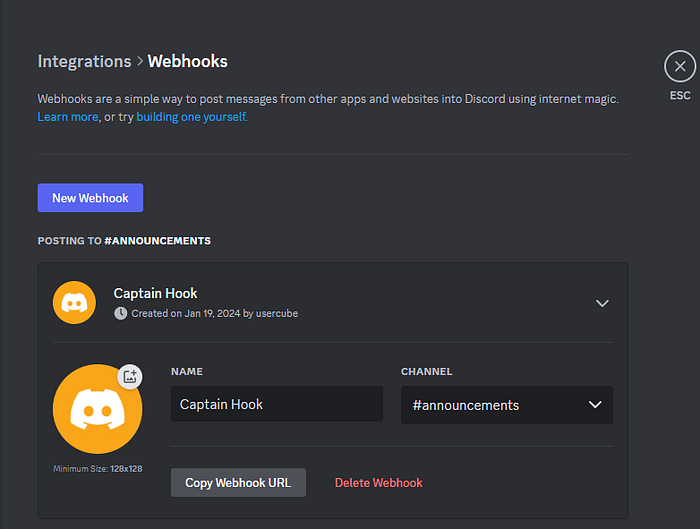
To get a webhook for Discord, go to Server Settings > Integrations > Webhooks, then create a webhook and copy the provided URL for message posting.
Press enter or click to view image in full size
Executing the project
Now, we need to define our webhook as an environment variable. This can be achieved by using dotenv. I will employ the export command in Linux
export DISCORD_WEBHOOK=https://discord.com/api/webhooks/...
Now you just need to execute your application:
node index.js

https://discord.com/api/webhooks/...
Server is running on port 3000
Your application will need public access, and you can deploy it using Heroku as well.
Set webhook on Heroku
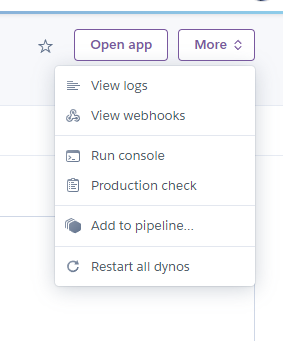
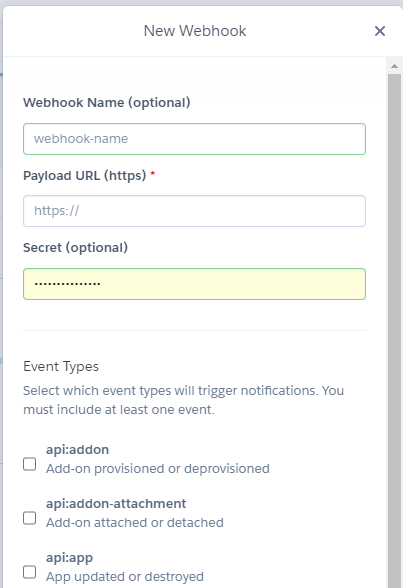
On you project (the one that you want to send messages from webhooks) go to More -> View Webhooks -> Create Webhook
Configure your webhook settings and save them.
Note: The webhook URL should be the address for the application that is currently under development.
Test notifications
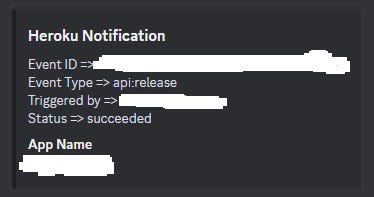
Now you can initiate a build for the application where you want to utilize the webhook. In your Discord channel, you should receive a notification similar to the following:
Conclusion
The integration of webhook messages from Heroku to Discord offers a powerful solution for streamlining communication in your development workflow. By seamlessly connecting these platforms, you enhance real-time updates and notifications, fostering collaboration and efficiency among your team members. The straightforward implementation and flexibility of webhooks empower you to tailor the communication process to fit your specific needs, creating a more responsive and dynamic development environment. As technology continues to evolve, embracing tools like webhooks not only simplifies communication but also contributes to a more connected and agile development process. Ultimately, by leveraging the synergy between Heroku and Discord, you can propel your project forward with timely and relevant information, enhancing overall productivity and success.
You can find the code I used on my GitHub Repository.